![1st May: Pit Babe the Series (2025), 2 Seasons [TV-MA] (6/10)](https://occ-0-1141-92.1.nflxso.net/dnm/api/v6/0Qzqdxw-HG1AiOKLWWPsFOUDA2E/AAAABVquqjQuLdumAvPVG9nIgHEQAz02PHqSinRuARH19fTUZsGY-94nURVK8w_wLLpTofVWfyvF-VVGEapigenS4gJkRH9zgGashrLw_EbC1QpSFsCdCfm9aMT88bF6isSuSiKpB9ykvtpk53flyXR3w0k8dY4g3kOItF7ebM1zEpj1XA.jpg?r=bcc "1st May: Pit Babe the Series (2025), 2 Seasons [TV-MA] (6/10)")









Reviews and recommendations are unbiased and products are independently selected. Postmedia may earn an affiliate commission from purchases made through links on this page.
Apple’s most affordable laptop is now available in Canada.
The
MacBook Neo
is the first of its kind, namely an entry-level laptop that’s designed for everyday users. The 13-inch laptop has all of the features of a Mac that you know and love, with a few fun new features that creators, or anyone who has been begging for Apple laptops to return in fun colours, will be sure to love.
For those who haven’t invested in a MacBook due to their hefty price tags, the Neo’s $799 starting price might just be the thing that convinces PC or Chromebook users to make the switch. Here’s what you need to know before buying one for yourself.
What:
MacBook Neo
Release date:
March 11, 2026
Where to buy:
Apple
|
Amazon
|
Best Buy
Price:
$799 CAD for 256 GB storage, $999 for 512 GB storage

| Pros 👍 | Cons 👎 |
|
|
New and noteworthy features: Colourful design, sustainable materials, iPhone Mirroring
Colourful design:
The first thing to note about the MacBook Neo is its striking colour, which stands out among a sea of black and silver laptops. I’ve been testing the shade “Blush,” which is a pale pink colour that fits right into my desk’s aesthetic. The laptop is also available in “Indigo,” a deep navy, and “Citrus,” a vibrant yellow-green hue, along with classic silver.
The entire aluminum exterior is finished in this shade, and the signature Magic Keyboard and trackpad are colour-matched too. This marks the first time that any of Apple’s laptops have a colourful keyboard, which just adds to the fun of the Macbook Neo.
Sustainable materials:
The MacBook Neo is Apple’s lowest-carbon MacBook, and is designed with sustainability in mind. It’s made using 60 per cent recycled materials (the highest percentage of any Apple product), including 90 per cent recycled aluminum overall and 100 per cent recycled cobalt in the battery.
iPhone mirroring:
For amateur content creators who switch between their phone and their laptop when editing photos or videos for social media, the iPhone Mirroring feature will be a game-changer in streamlining the editing process. With iPhone Mirroring, users can view and interact with their iPhone directly on their MacBook Neo, cutting down on the steps needed to transfer files back and forth. It’s also a helpful feature for transferring documents from your laptop to your phone and vice versa.
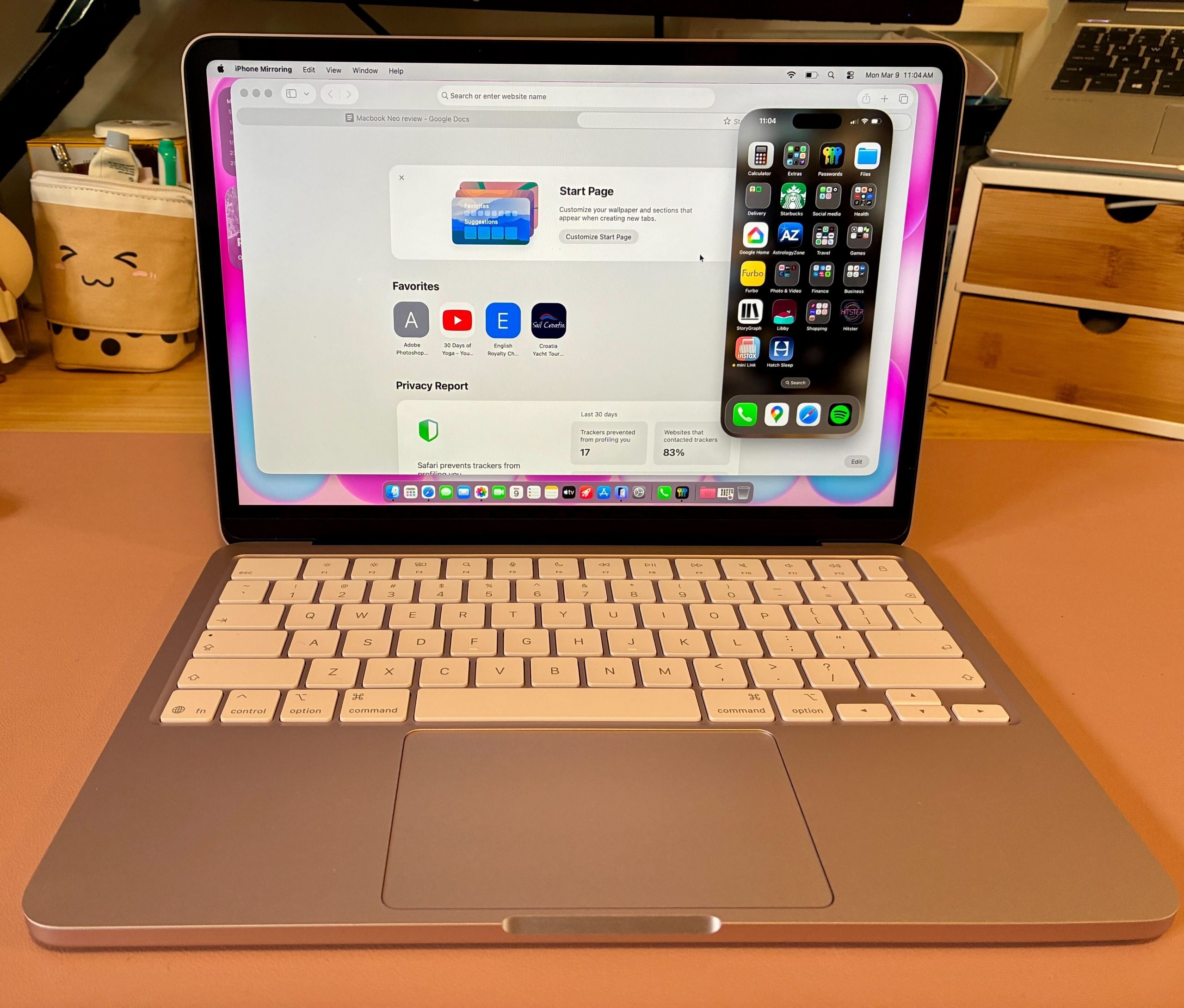
Is the MacBook Neo actually worth it?
I’m an iPhone user (and have been since the iPhone 3 first became available in Canada), and I appreciate how seamless the setup for MacBook Neo is with just my phone nearby. I simply had to scan a code on screen, sign into my AppleID on my phone and let all of my programs load on the laptop. Everything from my photos and videos to saved passwords transferred seamlessly in minutes. The laptop did require a software update upon unboxing, but the whole process maybe took 20 minutes to complete.
These days I mainly use my laptop for browsing online, some light photo editing, and streaming music, TV or movies. The MacBook Neo performs well at all of these tasks. The speakers on the MacBook Neo are surprisingly clear for its small size, with Spatial Audio that delivers immersive sound even if you’re not sitting directly in front of the laptop. The screen is also crisp and bright, with a Liquid Retina display that supports 1 billion colours.
This laptop is only available with a 13-inch screen, although it does support external monitors if you need a larger display. I’d recommend purchasing
a USB-C adapter
for use with external monitors, especially since the MacBook Neo doesn’t have a built-in HDMI port. Instead, it has two USB-C ports for connecting to accessories and charging. It also has a headphone jack for wired audio.
There are a couple of considerations about the MacBook Neo that may be dealbreakers for some users, namely the lack of a backlit keyboard and TouchID. Since this laptop doesn’t have a backlit keyboard like the pricier MacBooks, it may be an issue if you’re frequently working in low light. Secondly, the lower-priced 256GB laptop that I’ve been testing isn’t equipped with TouchID. If this is a feature that’s a must-have for you, you’ll have to pay an extra $200, since it’s only available in the 512GB version.
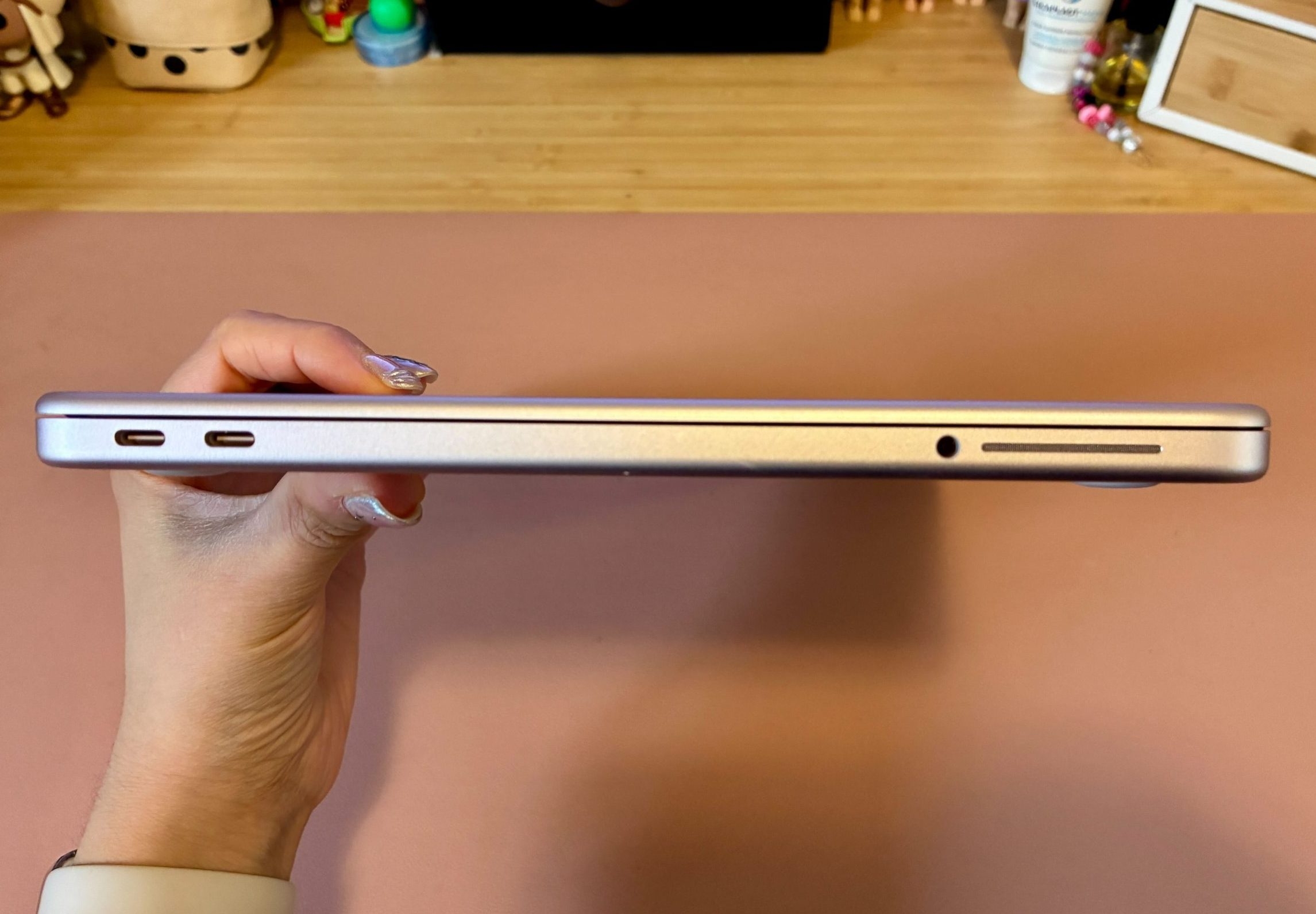
Who should consider the MacBook Neo?
If you have a relatively new Apple laptop, like the MacBook Air or MacBook Pro, then I wouldn’t recommend rushing out to buy the MacBook Neo. Additionally, if you find yourself in need of a device with lots of power for things like gaming, coding or more intense photo and video use, this laptop may not fit your needs.
Instead, I’d recommend this laptop for those who have been put off purchasing an Apple laptop due to its price, or if you have an older MacBook that’s in need of upgrading and you mainly use it for things like sending emails and browsing the web. It would also be a great option for students for note-taking, researching and creating projects.
As someone who falls into the second category (my 2016 MacBook Air is on its last legs), the MacBook Neo performs well for all of my everyday needs. Whether that’s watching YouTube videos, streaming movies and TV shows, organizing my photos or reading articles, I’m glad that there’s now a more affordable MacBook that can tackle everyday tasks without breaking the bank.
What:
MacBook Neo
Release date:
March 11, 2026
Where to buy:
Apple
|
Amazon
|
Best Buy
Price:
$799 CAD for 256 GB storage, $999 for 512 GB storage
MacBook Neo spec summary
Size:
1.27 cm (H) x 29.75 cm (W) x 20.64 cm (D)
Weight:
1.23 kg (2.7 pounds)
Chip:
Apple A18 Pro chip, 6‑core CPU with 2 performance cores and 4 efficiency cores, 5‑core GPU, 60GB/s memory bandwidth, hardware-accelerated ray tracing, 16-core Neural Engine
Memory:
8GB unified memory
Storage:
256 or 512 GB SSD
Camera:
1080p FaceTime HD camera, 1080p HD video recording
Operating system:
macOS
Audio:
Dual-speaker sound system, supports Spatial Audio
Display:
Liquid Retina display, 13.0-inch (diagonal) LED-backlit display with IPS technology, 500 nits brightness
Battery:
Up to 16 hours of video streaming, up to 11 hours of wireless web
Colours:
Blush, Citrus, Indigo, Silver
Ports:
(1) USB 3 (USB-C) port, (1) USB 2 (USB-C) port, (1) 3.5 mm headphone jack
What’s in the box:
(1) 13-inch MacBook Neo, (1) 20W USB-C Power Adapter, (1) USB-C Charge Cable (1.5 m)
Shopping Essentials, a category written by research-obsessed shopping fanatics, is now on Canoe. Explore in-depth product reviews, expert recommendations and exciting collaborations — plus get behind-the-scenes info on your favourite brands and trending products —
learn more here
or
sign up for our newsletter
.
kmendonca@postmedia.com
instagram.com/kate.mendonca