









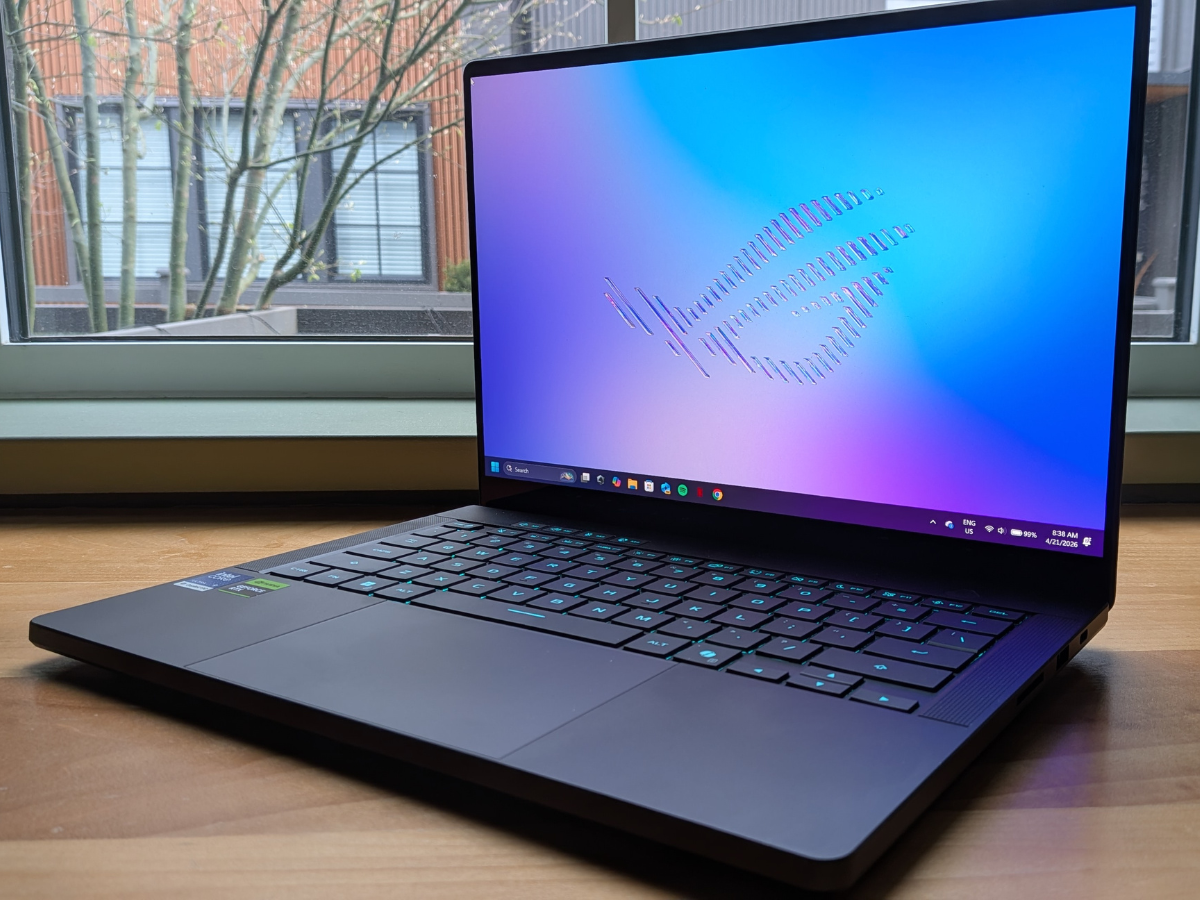
Starting at $4,299 CAD, the 2026 ASUS ROG Zephyrus G14 balance work and play with ease.
Article content
Reviews and recommendations are unbiased and products are independently selected. Postmedia may earn an affiliate commission from purchases made through links on this page.
The 2026 ASUS ROG Zephyrus G14 isn’t just a gaming laptop; it is a premium, do-it-all machine for the modern professional who refuses to give up their gaming hobby.
Advertisement 2
Article content
My life could be described as a full-hearted yet haphazard attempt at balance. Work, dadding, friends, a little self care. Plus, I’m a lifelong tech enthusiast who still tries to maintain a semi-respectable K/D ratio online (fail). I need something that looks professional enough to project during a meeting with clients or colleagues, light enough to toss in a backpack for a weekend cabin trip with my family and powerful enough to run the latest AAA titles when the house finally goes quiet at 9 PM.
Article content
Article content
For years, the 14-inch gaming laptop category felt like a series of compromises. But after spending a few weeks with the 2026 ASUS ROG Zephyrus G14 (specifically the GU405AR-DS96-CA configuration), I can confidently say those compromises are becoming a thing of the past. ASUS hasn’t completely redesigned the wheel this year; instead, they’ve made a series of smart, calculated refinements that add up to a drastically improved daily experience.
Here is how this tiny titan fits into the daily grind.
Advertisement 3
Article content
What: ROG Zephyrus G14 (2026) Gaming Laptop
Price: Starting at $4,299 CAD ($4,799 CAD as tested)
Where to buy:ASUS
| Likes 👍 | Dislikes 👎 |
|
|

First impressions of the 2026 ROG Zephyrus G14
Taking the 2026 Zephyrus G14 out of the box yields that same visceral unsheathing sensation I felt with last year’s G16. The anodized aluminum is cold to the touch, and the CNC-machined chassis is incredibly rigid. It doesn’t scream “gamer” with aggressive red accents or chunky vents. The subtle Slash Lighting on the lid returns, but it now looks like a sleek, mirrored slash when turned off. When you do turn it on, the jump from 7 to 35 lighting zones allows for some incredibly nerdy customization, letting you set different themes for startup, sleep mode or when your battery runs low.

Shopping Essentials
Article content
Advertisement 4
Article content
ASUS has truly perfected the “stealth gamer” aesthetic. The G14 weighs in at about 3.48 lbs (1.58 kg) for this 5070 Ti configuration, making it an absolute breeze to commute with or carry out to the patio. One of my biggest gripes with previous models was the slightly wobbly hinge. This year, ASUS introduced the EasyLift Hinge 2.0, and it is a revelation. The torque is consistent from the moment you lift the lid, allowing for a buttery-smooth one-handed open with drastically reduced screen bounce.
The port layout remains solid with a proper mix of USB-C (Thunderbolt 4) and USB-A (3.2 Gen 2), but the true hero for creators is the inclusion of a full-size UHS-II SD card slot—a massive upgrade from the tiny microSD slot of the past.

How does the ASUS 2026 ROG Zephyrus G14 perform?
Display
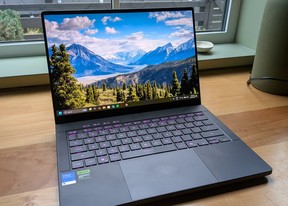
The display on this machine is nothing short of spectacular. Asus has packed a 3K (2880 x 1800) resolution, 120Hz 16:10 OLED panel into this 14-inch frame, but the real story is the brightness. Now Nebula HDR certified, this Pantone Validated panel peaks at an absurdly bright 1100 nits—basically double what older models could output.
Advertisement 5
Article content
Combined with an average Delta E of under 1 and a new ambient light sensor, the viewing experience is phenomenal whether you’re working in a brightly lit office, editing photos on a sunny deck or exploring the shadowy, path-traced corners of Cyberpunk 2077. HDR content truly pops, the 0.2ms response time is incredibly snappy and the G-Sync support via NVIDIA Advanced Optimus means tearing is non-existent.
Battery life
Here is where the Intel “Panther Lake” Core Ultra 9 386H really shows its utility. Thanks to the focus on efficiency with this architecture and the onboard NPU (capable of up to 50 TOPS), I was able to squeeze out about 8 to 9 hours of standard office work—emails, Slack, browsing, and video calls—on a single charge when using silent mode. When you fire up a game and switch to turbo, of course, that battery drains much faster, but for everyday mobility, it finally acts like a true ultrabook.
For charging, the included 250W brick will get you 50 per cent charge in 30 minutes which is helpful, and since both USB C ports on each side of the device are PD enabled, you can charge it at up to 100W on either side of the device.
Advertisement 6
Article content

Gameplay performance
The NVIDIA GeForce RTX 5070 Ti Laptop GPU (packing 12GB of ultra-fast GDDR7 memory) inside this tiny frame is a beast. Powered by Nvidia’s latest architecture, I was seeing desktop-class frame rates in modern titles. Crucially, ASUS bumped the total TGP on the G14 to 130W (in manual mode) this year compared to 110W in 2025.
The compromise? You cannot cheat physics. When pushing the Intel Ultra 9 and the RTX 5070 Ti to 130 watts, the chassis above the keyboard can get a little warm to the touch, and the fans in Turbo mode drew the ire of more than a couple people in my local library when I was testing Starfield with settings cranked. You will absolutely want a good gaming headset when you play to drown out the noise, but given the desktop-tier performance output, it’s a trade-off I’m willing to accept.
The default operating mode is ‘Performance’ which is actually well balanced, but I tried gaming in both ‘Turbo’ and a custom-configured ‘Manual’ mode which allows you to push the G14 to its maximum. It’s important to know that the modes don’t just adjust the fan curve (how quickly the fans kick in at higher RPM), they also unlock higher TGP, allowing the RTX 5070 Ti to flex all its muscle. The benchmarking I did revealed a real difference jumping from a ‘Great’ 30.19 FPS in Turbo mode to a ‘Legendary’ 38.8 FPS in Manual mode.
Advertisement 7
Article content
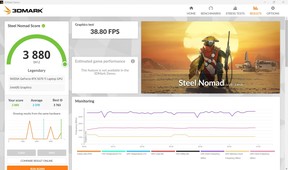
The GPUs in the higher end models of the G14 (like the unit I tested) can reach a maximum of 130W of power. But it may only look like you’re getting 110 in Armoury Crate. Here’s why:
- The Base (110W): When you’re in “Manual Mode,” the GPU starts with a steady 110W of power.
- The Extra (20W): The system can automatically add an extra 20W (called Dynamic Boost) to push performance further.

How to get the full 130W
The extra power kicks in automatically when the laptop isn’t too hot and the CPU isn’t using all the energy. To make sure you’re getting the best performance, ensure:
- Your laptop is plugged into power.
- You are using Manual Mode in Armoury Crate.
- Your BIOS and NVIDIA drivers are fully updated.
Who should upgrade to the ASUS 2026 ROG Zephyrus G14?
If you look back at my review of the 2025 Zephyrus G16, I praised its blend of power and portability. The 2026 G14 doesn’t reinvent the wheel, but it fixes almost every minor annoyance from the previous generation. Here is a quick breakdown of how it stacks up against the 2024/2025 chassis:
Advertisement 8
Article content
- The hinge: The EasyLift Hinge 2.0 completely eliminates the tight-then-loose-then-tight feel and wobble of the older models, making it feel distinctly more premium.
- The display: Jumping from roughly 500 nits to 1100 nits peak brightness for HDR content is a game-changer. If you use your laptop outdoors or near bright windows, this alone is worth the upgrade.
- Ports: Swapping the microSD slot for a full-size SD card slot is a massive win for photographers and videographers who don’t want to carry dongles.
- Power: The bump to a 130W TGP gives the new RTX 50-series cards the breathing room they need, while the Intel Panther Lake CPU handles the thermal and battery efficiency better than last year’s silicon.
- Aesthetics: The jump from 7 to 35 lighting zones on the lid adds a fun, granular level of customization that nerds like me will spend way too much time tweaking.

If you own a 2025 model, this is a refined iterative step—you might not need to upgrade right away. But if you’re holding onto a 2022 or 2023 machine, the jump in screen quality, hinge mechanics, and sheer graphical horsepower makes this an incredibly compelling leap, despite the steeper price tag this year.
Advertisement 9
Article content
Yes, it gets loud when pushed, the starting price demands a serious investment, and the soldered 32GB of 8533MHz RAM means what you buy is what you’re stuck with. But the sheer density of power, combined with a jaw-dropping 1100-nit OLED screen, refined hinges and a chassis that looks equally at home in a boardroom or a LAN party, makes this the 14-inch laptop to beat.
What: ROG Zephyrus G14 (2026) Gaming Laptop
Price: Starting at $4,299 CAD ($4,799 CAD as tested)
Where to buy:ASUS
ASUS 2026 ROG Zephyrus G14 specs
- Operating system: Windows 11 Home
- Processor: Intel Core Ultra 9 Processor
- Graphics: NVIDIA GeForce RTX 5070 Ti Laptop GPU
- Neural Processor: Intel NPU up to 50TOPS
- Display: ROG Nebula HDR Display, Anti-reflection(AR) display
- Memory: 32GB LPDDR5X 8533 on board
- Max Capacity: 32GB
- Memory Slot: No expansion possible
- Storage: 1TB PCIe 4.0 NVMe M.2 SSD
- Ports: (1) 3.5mm Combo Audio Jack, (1) HDMI 2.1 FRL, (2) USB 3.2 Gen 2 Type-A, (1) USB 3.2 Gen 2 Type-C, (1) Thunderbolt 4 support, (1) SD card reader
- Camera: 1080P FHD IR Camera for Windows Hello
- Audio: Dolby Atmos Smart Amp Technology, built-in array microphone
- Network and Communication: Wi-Fi 7(802.11be) (Triple band) 2*2 + Bluetooth® 6.0 Wireless Card
- Battery: 73WHrs, 4S1P, 4-cell Li-ion
- Power Supply: Rectangle Conn, 250W AC Adapter
- Weight: 1.58 Kg (3.48 lbs)
- Dimensions: 31.1 x 22.0 x 1.59 ~ 1.83 cm (12.24″ x 8.66″ x 0.63″ ~ 0.72″)
- Colours: Eclipse Grey, Platinum White
Read More
-

I tested the GoPro-inspired laptop as a lifelong Mac user — here’s my honest take
-
ASUS Zenbook Duo 2026 review: Are two screens better than one?
Shopping Essentials, a category written by research-obsessed shopping fanatics, is now on Canoe. Explore in-depth product reviews, expert recommendations and exciting collaborations — plus get behind-the-scenes info on your favourite brands and trending products — learn more here or sign up for our newsletter.
Article content