







![18th Jul: Companion (2025), 1hr 37m [R] (6.45/10)](https://occ-0-7328-92.1.nflxso.net/dnm/api/v6/0Qzqdxw-HG1AiOKLWWPsFOUDA2E/AAAABV4_88mc-kDi5VLg_sA7lMcpurAg5Z2-1OX0mBe43LGbAhvz7lTAbwbOu9jvGbqLEUwU-eKnUuIUh-9e0XHtMDCz2X-eO9e39yPNnCQfXvAbGcTOE46NwFD2nT06O2xweRL9F5aFJb_S4ccGUDKYXwZq0z-EGaKU0xZu4vYNPQSz4w.jpg?r=5af "18th Jul: Companion (2025), 1hr 37m [R] (6.45/10)")


Article content
Reviews and recommendations are unbiased and products are independently selected. Postmedia may earn an affiliate commission from purchases made through links on this page.
Have you ever seen something move and instantly had a nostalgic sound called forth from your memory? As soon as I first saw the Zephyrus Duo transform from an unassuming 16” laptop to a dual screen behemoth, I was transported to the floral patterned couch of my youth, staring agog as Optimus Prime changed from semi truck to Autobot with that iconic ‘chee-chu-chee-chah’.
Advertisement 2
Article content
The 2026 ASUS ROG Zephyrus Duo is a piece of engineering that seems to have been plucked from a sci-fi set and dropped into the lap of the most demanding power users. After a few weeks of living with its dual screens, I’ve realized that despite the bonkers price ($8,999 CAD as tested), dual monitor die-hards just might see the value. It isn’t just about the “wow” factor of a second display; it’s about how that display can fundamentally change the way you interact with your mobile machine.
Article content
Article content
What: ROG Zephyrus Duo (2026) Gaming Laptop
Price: Starting at $5,499 CAD
Where to buy: ASUS Store
ASUS ROG Zephyrus Duo Gaming Laptop review: Notable impressions
| Likes👍 | Dislikes👎 |
|
|
Who is this device for?
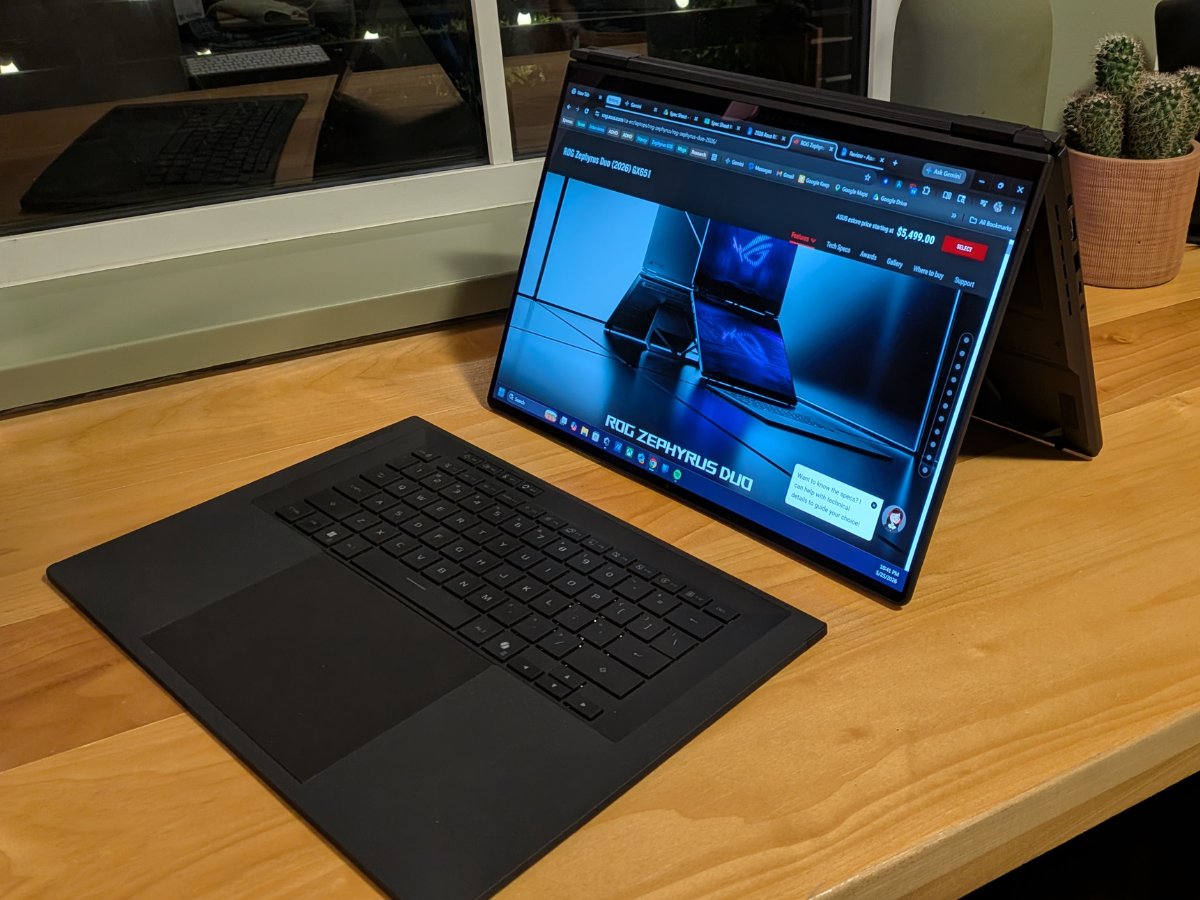
The very first thing anyone says when seeing the Zephyrus Duo is some variation of: “Who is this thing for?” In previous years, it was a niche luxury, but the shift to an entirely modular design completely alters the pitch. By making the 5.1mm ultra-thin keyboard entirely detachable via Bluetooth, you aren’t just getting a laptop with a bonus screen real estate strip anymore. When propped up on its built-in kickstand, you are looking at two full-size, 16-inch equivalent OLED displays stacked vertically in front of you.


Shopping Essentials
Article content
Advertisement 3
Article content
One of the most surprising use cases came during a “real estate site blitz” with my wife. Instead of huddling over a single monitor, we used the Duo in tent mode. With different web pages open on each screen, it felt like having two separate computers in a single chassis that we could share and collaborate on from opposite sides of the table. It turned a typically frustrating shared task into a seamless, collaborative effort.


After putting this device through its paces, I can say the Duo is for the person who typically rocks multiple displays and then feels hindered and held back when out and about. The 16-inch Nebula HDR OLED displays are 240Hz masterpieces. The only real difference between the two screens is that the primary display (the top one when fully unfurled in landscape dual screen mode) is the only one with G-SYNC.
I’m not a streamer, though that would be an ideal use case. In my daily life here’s how I put the second screen to use:
- Remote D&D sessions: For my remote Dungeons & Dragons campaigns, the Duo is a boon. I can have my character sheet and the video call on the top screen near the webcam, leaving the lower panel entirely for the game board.
- Gaming with support: While gaming, I’ve used the second screen to keep Discord, Reddit threads, or 3rd-party map sites active without ever having to Alt-Tab out of my main experience.
- Landscape web viewing: Spanning a single webpage across both screens in landscape mode creates an incredibly tall view that’s perfect for long articles or deep-dive research.
Advertisement 4
Article content
Under the hood, this machine is an absolute titan. My test unit was packed with the NVIDIA GeForce RTX 5090, and the performance is undeniable. Much like theZephyrus G16, it handles AAA titles like Cyberpunk 2077and Starfield with every setting cranked to the max without breaking a sweat.
Favourite feature: Dockable bluetooth keyboard
I wasn’t sure how the keyboard was going to feel, perform, or fit in with the transformative use cases of the Duo. Honestly, I was pleasantly surprised in pretty much all areas. At 5.1mm it’s thin enough to snap magnetically to the bottom screen and take the place of a typical keyboard on a clamshell laptop. But it can also detach and roam around or be passed between two people with ease.
Something I loved about the fact that the keyboard detached was that when I was gaming, my hands were nowhere near the heat of the laptop. Not only that, but I could change my orientation to the screens, shift to face my external display, or even keep the Duo a bit farther away from my 32” OLED monitor that I often use while gaming; moving the fan noise further away from where the action was happening. Given its capability, when at home it was kind of like having a tower PC that also happened to act like 2 separate monitors.
Advertisement 5
Article content


Least favourite feature: Fan system
The thermal management is made possible by a massive vapour chamber covering 45% of the motherboard, graphite nano-insulated film to protect the OLED panel, dust filters, a pair of heatsinks, two fans and three exhaust vents. The device utilizes an upgraded AAS Plus 2.0 system featuring liquid metal thermal compound and a specialized graphite heat sheet designed specifically to insulate the sensitive lower OLED panel from motherboard hot spots. When you open the machine, the secondary display tilts up automatically, exposing wide-open air intakes that pull cool air directly into the three-fan array.
Because the device exhausts tremendous amounts of heat out of its three side and rear vents, keeping the built-in kickstand deployed is a critical part of the cooling strategy. If you try to run heavy workloads with the Duo sitting completely flat on a plush surface (don’t hate a guy for trying to game in bed), the fans will immediately ramp up into a loud, vacuum-like whine as the system scrambles to keep temperatures under control.
Advertisement 6
Article content


Who should consider the 2026 ASUS ROG Zephyrus Duo?
The ASUS ROG Zephyrus Duo is a specialized tool for a specific kind of nerd. It’s for the person who needs to monitor a stream while they play, the developer who wants code on one screen and output on the other, or the D&D player who wants the ultimate remote dungeon crawler kit. It’s practical for heavy multi-taskers, even if the price and size make it a bit of a superfluous luxury for the casual user.
If you’re looking for a device that pushes the limits of design and engineering to support a high-octane digital lifestyle, the Duo stands alone in its class.
What: ROG Zephyrus Duo (2026)
Price: Starting at $5,499 CAD ($8,999 CAD as tested)
Where to buy: ASUS Store
ASUS ROG Zephyrus Duo 2026 specs
- Model Name: GX651AX-DS98-CA
- Material and colour: CNC-milled Aluminum Stellar Grey
- Operating System: Windows 11 Home
- Display: Dual 16” ROG Nebula HDR OLED touchscreens, 16:10, 3K, 0.2ms, 120hz, DCI-P3 100%, Peak 1100 nits, supports VESA DisplayHDR™ True Black 1000, Delta E <1
- CPU: Intel Core Ultra 9 386H processor 2.1 GHz
- NPU: Intel NPU up to 50TOPS
- GPU: NVIDIA GeForce RTX 5090 Laptop GPU 24GB GDDR7
- Memory: 64GB LPDDR5X-8533 onboard memory
- Storage: 2TB PCIe 4.0 Performance SSD 2x M.2 PCIe (includes used)
- I/O Ports: (1) DC-in Jack, (1) HDMI 2.1 FRL, (2) USB 3.2, (2) Thunderbolt4 Type-C, (1) Audio combo jack, (1) SD card reader
- Keyboard: Bluetooth wireless keyboard, One-zone RGB backlight
- Audio: 4-speaker (dual-force woofer) system with Smart Amplifier Technology, 2 Tweeters
- Battery: 90WHrs, 4S1P, 4-cell Li-ion
- Dimensions: 35.5 x 24.6 x 1.99 ~ 2.49 cm (13.98″ x 9.69″ x 0.78″ ~ 0.98″)
- Weight: 2.80 Kg (6.17 lbs)
Read More
-

ASUS Zenbook Duo 2026 review: Are two screens better than one?
-

Is the 2026 ASUS ROG Zephyrus G14 worth its hefty price tag? Here’s my honest take
Shopping Essentials, a category written by research-obsessed shopping fanatics, is now on Canoe. Explore in-depth product reviews, expert recommendations and exciting collaborations — plus get behind-the-scenes info on your favourite brands and trending products — learn more here or sign up for our newsletter.
Article content
