








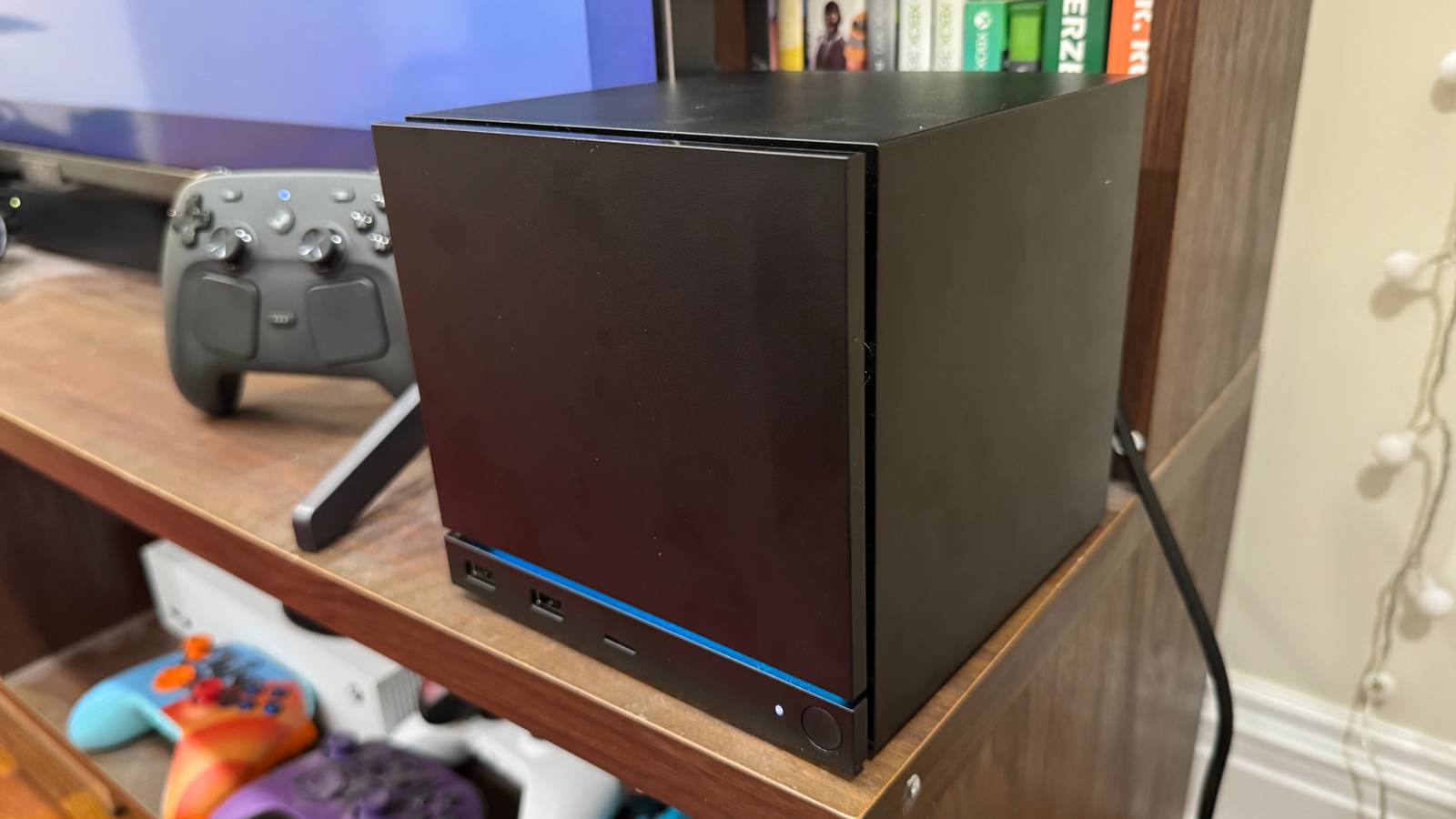
If you’re wondering who the target audience is for the Steam Machine, you’re looking right at him. Valve’s mini-PC was custom-built for my exact situation. I’m a lifelong console owner who has always preferred plug-and-play ease over fiddly optimization. A friend built my current PC rig for me in 2016, and I’ve been putting off upgrading it for years because I just don’t want to deal with the headache. I’ll happily compromise on resolution and framerate if it means comfortably playing a game curled up on my couch with a Nintendo Switch 2 rather than in my crappy office chair. There’s a lot of PC hassle I can live without, but I do hunger to play Steam games and exist in that ecosystem.
That’s where the Steam Machine comes in. Priced between $1,049 and $1,428 for the top-end model, Valve’s sales pitch is that the little black box can bridge the gap between PC and console owners, giving the latter a plug-and-play solution that’s as easy to use as a PlayStation 5. Based on the time I’ve spent living with the device so far, the Steam Machine delivers on its casual ambitions. It’s a major graduation from my Steam Deck, and it will keep me from upgrading my PC during a RAM apocalypse. But as someone who is still technically-minded enough to analyze a benchmark test, I can’t deny that the Steam Machine’s hefty price tag doesn’t make financial sense, any way you slice it. The value you’ll get out of it is inversely proportional to the amount you know about hardware.
From a design standpoint, the Steam Machine is a perfect little creation. It’s one of the few modern gaming devices that can actually sit snugly next to my TV, whereas my Xbox Series X and PS5 are stuck flopping on their sides in my entertainment center. It’s an unobtrusive object, but its LED light strip and swappable magnetic faceplate give it enough character to liven up my TV space. It’s very portable too, easily fitting inside my usual travel backpack alongside its cables and my Steam Controller. It doesn’t have a handle, but close enough: Welcome back, GameCube!
It may sound silly to praise the cute factor of a PC, but it’s an important selling point for Valve. The Steam Machine’s value isn’t in powerhouse specs; it’s in lifestyle branding. Valve is quietly taking pages out of the Apple playbook as of late, creating an ecosystem built around matching products that have “Steam” right in the name. If you’re going to play PC games via Steam, why not pick up a handheld, console, controller, and VR device that all work with one another and look similar? You’re paying just as much for aesthetic coherence in your gaming setup as anything, just as you are when you buy a $100 black-and-white PS5 headset.
Everything about the Steam Machine starts to make sense when you view it through that casual consumer lens. For those who don’t care to know much about their tech, there’s an appeal to having consistent devices that don’t require you to read an instruction manual with each new gadget. That’s baked into the Steam Machine’s seamless setup process. All you have to do is plug it in, set some quick details like your time zone, and log into your Steam account. That’s it. In less time than it takes to set up a Nintendo Switch 2, you’re staring at your entire Steam library on a TV screen. The only stop sign you’ll hit is if you don’t already have a Steam account, as you’ll need to make one first. It feels like magic if you’ve never thought to plug your PC into a TV, and that probably describes more people than you’d expect.
If you own a Steam Deck, you already know how to navigate it all since the box is running a virtually identical version of SteamOS. That’s Valve’s secret weapon at present: a clean UI that puts your library, friends list, and Steam store all in one place. If you’ve yet to encounter SteamOS, you won’t have much trouble learning how to use it. It’s as easy to navigate as a PS5 or Xbox interface. Your home screen will show you a row of your most recently played games front and center, alongside widgets showing you news and updates on your games. Every menu is neatly organized, so you won’t be confused as to how to access your game library or find the Steam store.
There aren’t really new tricks to toy around with on the Steam Machine. You can still download custom start screens, listen to game soundtracks, set performance overlays, and mess around with system-level tech like framerate limiting. It just feels like logging into the website you use at home on a library computer and having it function just the same. I have never felt less friction when setting up a modern video game console, let alone a PC.
The ease of use extends to actually playing games. On day one, I downloaded a dozen random games from my Steam library and tried firing them up. They ranged from brand-new AAA games to a tiny indie my late friend made before SteamOS existed, which he never got to optimize for Steam Deck. Every game I launched worked with no issues, including some games that aren’t even officially out yet. That’s a night and day difference between my first experience with the Steam Deck, where half of my initial testing suite just wasn’t functional on the handheld at launch. Being able to launch Mina the Hollower without even questioning whether it would run at 60 frames per second out of the box is a selling point for a console player.

From that specific perspective, the Steam Machine impresses. Part of my test suite involved loading up games that I’ve been playing on my Steam Deck this year, where I’ve been getting a very compromised technical experience. Monster Hunter Stories 3: Twisted Reflection runs on Steam Deck, but only at a choppy framerate that’s tough to hang with. It runs at a clean 60 frames per second on the highest available setting on Steam Machine. The same was true for Lego Batman: Legacy of the Dark Knight. The default presets for Steam Machine can get you in the 100 fps range if you disable your frame limit. Compare that to the Steam Deck, where you’re dipping below 30 fps even on low settings.
When I discuss performance here, keep in mind that I’m talking about these games running at the realistic settings that will get you a smooth framerate. We’re largely talking about 1080p resolutions here in these “too good to be true” scenarios. Valve’s initial promise of 4K gaming at 60 fps has proven to be misleading, which has already turned some enthusiasts against it. You have upscaling options to play with, but we won’t really know how capable the Steam Machine is until it gets access to FSR 4, AMD’s upscaling tech that’s more powerful than what the Steam Machine currently has. There’s no firm release date for it, but it sounds like it’s expected soon. Until then, you’re probably going to be playing at 1080p if you want to hit 60 fps in most high-end games.
Everything I tried on that end of the spectrum was perfectly playable with their default settings, with some caveats. Stalker 2: Heart of Chornobyl looks and runs about as good as it does on an Xbox Series X at a glance, though it goes a little haywire if you disable the PC’s 60 fps limiter. Borderlands 4 performs admirably in first-person, but the framerate tanks as soon as you get on your mount. You’ll find the seams the more you try to push the system to its limits, but you generally have a lot of flexibility, since you’re not starting with everything dialed all the way down.

The best example of that can be found in Crimson Desert. Despite not being officially verified for Steam Machine, the ambitious open-world game actually runs just fine on it. (Also astonishing is that the Steam Machine is virtually silent, even when you’re pushing it as far as it can go.) You do have to make noticeable visual compromises to get it running at 60 fps, but you can still get it there. I spent a good two-and-a-half hours playing, and I forgot about the tech powering it quickly. It just felt like playing a game on console, and that’s a dream come true for anyone who has tried to launch a new game on their dated PC and spent an hour struggling with settings to even get it running at 30 fps.
Now here’s the rub: Every casually exciting result that I’m citing here falls apart the moment the testing goes below the surface. The first wave of Steam Machine reviews that dropped this month all came from a who’s who of nerdy tech outlets. PC Gamer, Digital Foundry, The Verge, and Gamers Nexus all dove into the hard data, and the results were indisputable: The Steam Machine’s power doesn’t match its price. My more scientific testing confirms the same thing, as the Steam Machine is slightly less powerful than a base PS5 for double the price. There’s just no arguing with that hard fact, and that turns what should be a neat gaming device into something that’s very difficult to financially justify.

A lot of the extra selling points I could make about the Steam Machine only work if you forget about the fact that you can accomplish all of them by buying a proper PC. As a console, it’s incredible that the Steam Machine comes with a Linux operating system that you can control in desktop mode with a mouse and keyboard. Having the flexibility to mod games or download emulators straight to the Steam Machine is third-eye-opening if you’re coming off a PS5. But actually, you don’t even need to buy a Steam Machine to do any of this or get the clean SteamOS experience! The exciting perks become mundane the more in-the-know you are.
But you don’t know what you don’t know. If you’re someone who has never even seen what 90 fps looks like, the Steam Machine will feel like a revelatory purchase. It’s easy to put a price on a machine based on benchmark numbers, but it’s harder to visualize the value of convenience. For those who just find PC gaming too intimidating to get into, the Steam Machine’s plug-and-play potential is worth something.

Remember that I’m speaking as someone in the target audience here. Even when my now-ancient PC was a fresh new device capable of playing new games, I wasn’t tinkering with the settings in my games to max out performance. A medium preset was fine. I’ve long had the ability to run a cable from my PC to my TV to play on my couch, but it’s just clumsy enough to feel like a waste of my time. The Steam Deck was a game-changer for me when it was released not because I could finally play PC games, but because I didn’t have to think about how to play them.
That’s the person a Steam Machine caters to. You plug it in, turn it on, and Crimson Desert just runs on the damn thing. No, it doesn’t perform as well as it would on high-end rigs or even a PS5, but what do I care? The time-to-play is miniscule, and that’s as valuable to me as maxed out ray-tracing is to a techie. I love that I’m able to open the Steam store on my TV, buy a game at a deep discount, and start playing it. The fact that I can play a game on Steam Machine and then instantly have that save data transferred to my Steam Deck is a Switch-level feature that could permanently alter my gaming habits. And not having to pay a monthly fee to play online? That might just get me to cancel my PS Plus subscription. Having access to Linux and the flexibility it opens is an added value on top of that. (Though I have not become any more skilled at using it, despite years of owning a Steam Deck.)
I would be lying if I said that the Steam Machine isn’t filling the exact role I hoped it would.
Yes, I know how infuriating all of this probably sounds if you’re an expert. All logic dictates that someone like me should just buy a more powerful mini PC for the same price and just launch Steam in Big Picture Mode. I have actually recommended the same to a friend who was waffling over whether to drop $1,049 on a Steam Machine. Of course not! It’s outclassed in every metric! But there are intangibles at play here. Valve knows how to make a piece of hardware that feels premium. It knows how to streamline the PC gaming experience to the point where you never need to know what a graphics card is. It knows how to push updates that will make a machine you can’t mod better over time. The Steam Machine already feels like my Steam Deck, a device that I can’t imagine replacing even though there are more powerful handhelds on the market right now. What is all of that worth in dollars and cents?
That answer is going to be radically different from person to person, which makes it nigh impossible to offer any sweeping recommendation of the Steam Machine. My head tells me that you shouldn’t buy one at its current price point, full stop. It’s not powerful enough for what you’re spending, and it’s in danger of becoming outdated fast if a new generation of consoles really is around the corner. (Though good luck to Microsoft launching Project Helix in 2027, when the Xbox Series X is now $800.) It also still shares some frustrating quirks with other Steam devices, including the fact that you just can’t play some of the biggest games in the world on it due to anti-cheat incompatibility. Are you really going to spend over a grand on a machine that can’t run Fortnite?
But I would be lying if I said that the Steam Machine isn’t filling the exact role I hoped it would when it was revealed. At the end of the tiring workday, I plop down on my couch, press one button on my Steam Controller, and I’m instantly staring at my PC library on my TV. If that sounds like your ultimate gaming dream, who am I to tell you to get on PCPartPicker and assemble a superior machine that runs games at a framerate that won’t even register to your eyes?
The Steam Machineis available to reserve now. The hardware unit we tested was provided by Valve. You can findadditional information about Polygon’s ethics policy here.

14 Steam Machine questions you were afraid to ask, but we answered anyway
Welcome to Steam Machine 101